More Meetings, Less Data Entry: How Jump + Asset-Map Work Together
I talk with advisors every week about the same problem: what happens to everything a client says in a meeting once the meeting is over. A new account gets mentioned. A liability comes up. A goal shifts. The information is right there in the conversation, but getting it into a planning tool usually means going back through notes and typing it in by hand.
Jump and Asset-Map now connect that conversation directly to the plan. Jump captures and organizes what's discussed in a client meeting, and advisors can send that information into Asset-Map, where it updates the household. Advisors don't need to take notes by hand or lean on an assistant to track every detail. Instead, they can pay attention and ask good questions. "The meeting does the work," says Alison Susko, VP of Community at Asset-Map.
Where client meeting details usually get stuck
Every client meeting generates information a household plan depends on: new assets, changing liabilities, updated goals, a shift in a client's timeline. Getting that information into a planning tool usually means re-reading notes, deciding what changed, and entering it field by field.
For firms managing hundreds of households, that adds up fast, and a plan only holds up if it reflects what a client actually said in their last conversation.
Connecting the conversation to the financial picture
Asset-Map turns a household's financial life into a single visual map: assets, liabilities, insurance, income, and goals laid out in one place. Jump connects to that map directly. During a client meeting, Jump captures and organizes the relevant details as they come up. After the meeting, the advisor reviews what Jump identified and sends it into Asset-Map.
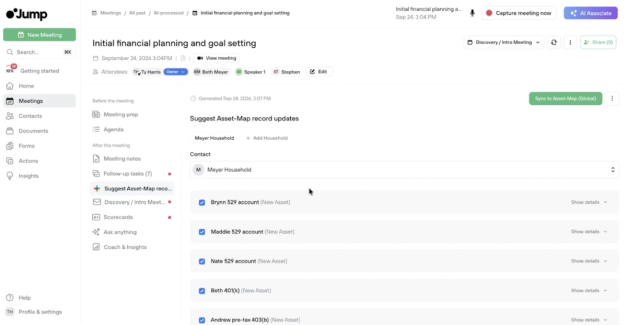
The advisor still makes the call on what's accurate. Jump organizes the information, but nothing updates in Asset-Map until the advisor reviews and confirms it: getting a client's name right, confirming which accounts belong to which household member, double-checking a figure the client may have estimated rather than stated precisely. Advisors aren't handing off judgment about what belongs in a client's plan, they're skipping the manual work of getting accurate information from a conversation into the record.
Three practical workflows: building, updating, and dictating a household plan
1. Building an initial Asset-Map from a new client conversation: A first meeting with a new household might cover held-away investments, family details, home value, and a mortgage. None of it needs to be typed in afterward. Once the meeting ends, the advisor opens the suggested updates, corrects a home value the clients overestimated, unchecks an item that doesn't need to be tracked, and syncs the rest. A fully built-out Asset-Map is ready in minutes, built from the conversation rather than a blank form.
2. Keeping existing households current after a review meeting: Client circumstances shift between review meetings. Jump identifies what changed in the conversation and flags it for the advisor to add to the household's existing Asset-Map, so the plan reflects the client's current situation rather than the one from six months ago. For example, the Asset-Map lists a client's primary residence as individually held. In the review meeting, the client mentions the home is now held jointly with their spouse. Jump flags the difference, and the advisor updates the ownership in about the time it takes to read this sentence.
3. Using advisor dictation to add known client information: Not every detail comes from a live conversation. An advisor can dictate what they already know about a household directly into Jump, and the platform organizes it for the Asset-Map update. An advisor might spend a minute describing two prospective clients, their ages, income, an old 401(k), cash to reinvest, and a home purchase, and have a starting Asset-Map ready to review before the two have even walked in the door.
More meeting time, less data entry
The time savings continue after the meeting ends. Advisors who use Jump save time on post-meeting administrative work that would otherwise go into documenting and updating systems by hand. That time goes back into the parts of the job a plan can't do on its own: understanding what a client actually needs and figuring out the next right action for their household.
An accurate, current Asset-Map also changes what the next conversation looks like. Advisors walk in with a household picture that already reflects the last discussion instead of one that's a meeting or two behind, which makes it easier to spot where a plan needs attention and where a client is already on track.
Getting started
Connecting Asset-Map to Jump takes a couple of minutes. In Jump, go to Profile & Settings, then User Settings, then Integrations, and add Asset-Map (Retail for U.S.-based accounts, Global outside the U.S.). From there, every captured meeting carries the option to review and sync updates to the right household.
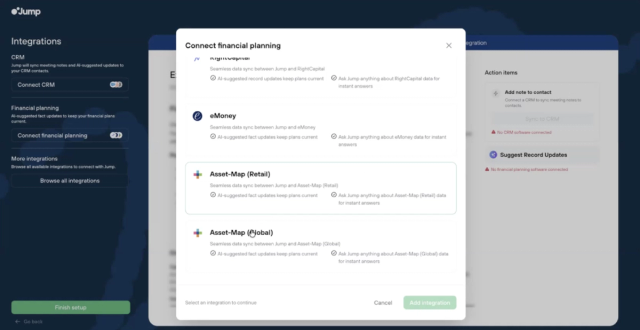
Full setup steps and troubleshooting are available in Jump's documentation, and both Jump and Asset-Map teams are available to walk through the integration directly.
See Jump in action, or schedule a demo with Asset-Map.