Financial Planning Integration
Jump +Asset-Map
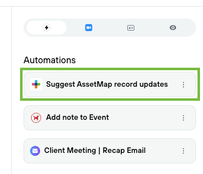
Asset-Map is a visual financial planning tool that helps advisors capture a client’s full financial picture through intuitive household maps. Connect Asset-Map to Jump to turn meeting conversations into structured household updates so client maps stay accurate, current, and ready for the next conversation. After each meeting, Jump analyzes the conversation and identifies potential changes such as new assets, liabilities, household updates, or evolving goals. Advisors can review and approve before syncing directly into Asset-Map.

Webinar / February 25th | 2 PM ET
Human-Centered AI in Action: Turn Client Conversations into Financial Plans
Join Asset-Map and Jump for a live walkthrough of their new AI-powered integration and see how advisors can turn client conversations into actionable insights, faster follow-up, and more aligned household planning.
Key Benefits
Faster plan updates
Replace manual data entry with a review-and-confirm workflow that makes it easy to update household maps after meetings.
Financial stories that stay current
Keep each client’s financial picture aligned with real conversations as life changes, priorities shift, and plans evolve.
Less post-meeting admin
Reduce time spent updating plans by letting Jump extract and organize insights automatically from meetings.
Conversation-ready household maps
Conversation-ready household maps
Feature Details
AI-Suggested Household Updates
Jump analyzes meeting conversations and proposes updates to Asset-Map households so advisors can review, edit, and confirm changes quickly.
Support for Core Planning Objects
Update key household elements including members, assets, liabilities, insurance, income, and expenses based on what’s discussed in meetings.
Advisor-Controlled Sync
All updates are initiated and approved by the advisor, ensuring accuracy and confidence before changes are applied to client households.
Direct Household Updates
Once approved, changes are applied directly to the selected Asset-Map household to keep client records current.
Conversation-Driven Planning
Household maps reflect what clients actually share in meetings, helping advisors maintain an accurate, real-world view of each financial story.
How it Works
Connect Asset-Map to Jump
Add the Asset-Map integration from your Jump settings and authenticate via OAuth.
Review suggested updates after meetings
After a meeting, Jump analyzes the conversation and proposes updates to Asset-Map household records.
Confirm and sync
Select the appropriate household, review the suggested changes, and approve updates to keep household maps current.
Resources
Help Center Article
Step-by-step guidance to help you get answers and move forward quickly.
Onboarding Webinar
Join a live, daily walkthrough to get set up and ask questions in real time.
Customer Support
Get account help, product support, or give feedback.