Your Client Context, Now in Claude for Financial Advisors

Jump is expanding its work with Anthropic by bringing Jump to Claude for Financial Advisors, Anthropic’s offering for wealth management professionals. Many advisors already use Claude, but advisors get the best results when Claude understands their clients. Now it’s even easier to draw on the rich context from Jump meeting transcripts, notes, documents, contacts, and tasks.
Advisors were already able to connect Jump to Claude with the Jump one-click Claude connector, and that connector is now included with Claude for Financial Advisors. Alongside it are eight new skills, which are reusable workflows for tasks like recapping a meeting, tracking commitments, and drafting a follow-up email. Below, you’ll find how to get started, details on each skill, and ways to use Jump and Claude together.
How to connect Claude to Jump
To get started, open Claude and find “Claude for Financial Advisors” in the plugin browser and install it. Note that Anthropic recommends Enterprise plans for registered investment advisers, because it includes the audit logs that support recordkeeping.
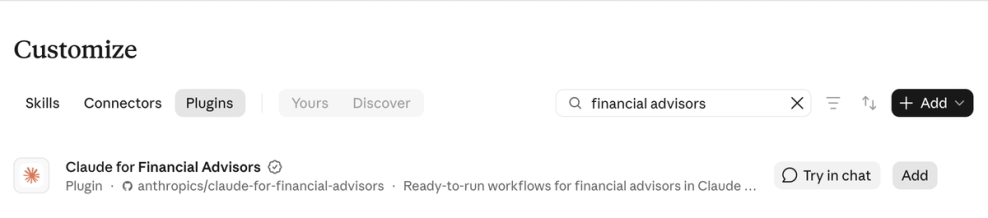
Once you’ve added the plugin, type /onboard into the prompt window and follow the guided setup process. The Claude for Financial Advisors plugin bundles advisor skills and connectors into a single install. In addition to the Jump connector, the bundle includes connectors for CRM, custodian, portfolio reporting, financial planning software, and estate tools. You choose which of these to connect during setup.
Once you’re connected, you can prompt Claude in plain language. For example: “Look in Jump and find my last meeting with [client].” When it’s relevant, Claude will automatically use the skills discussed below.
Remember that Jump gives Claude read-only access to your meeting transcripts, notes, meeting details, contacts, documents, and tasks. Claude can view Jump data but never change it.
To learn more, visit our help center: How to use Jump’s MCP client.
Skills for Claude for Financial Advisors
Along with Jump’s Claude connector, you get eight prebuilt skills. While prompts are requests you write yourself, skills are reusable workflows inside Claude, built for a specific task so you can run it the same way every time without writing a detailed prompt from scratch. With Jump and Claude for Financial Advisors, the following skills are available out of the box:
- Yesterday/Week in Review: Summarizes recent meetings, decisions, and outstanding items across your clients from the past day or week (two skills).
- Client Commitments: Identifies the promises you and your clients made across meeting history.
- Decision Log: Tracks decisions made with clients and the meetings where they came up.
- Meeting Recap: Shows where things left off with a client, including takeaways, decisions, and open items.
- Meeting History: Gives you a timeline of past conversations with a client or household.
- Recap Email: Drafts a follow-up email for you to review and send.
- Document Lookup: Finds client documents uploaded to Jump and pulls out the details you need.
With these skills, you can move from meeting prep to follow-up in one workflow, without pasting notes or retyping prompts. To use the skills, type a slash and the skill name, e.g., /client-commitments. You can also prompt Claude using plain language, and it will automatically initiate the relevant skills.
Prompts to try with Jump and Claude
These prompts are just a few examples of how you can use the Jump connector and skills in Claude for Financial Advisors, from clearing follow-up tasks to spotting what your clients keep asking about.
1. Catch up on commitments you’ve made to clients
Plain-language prompt: What have I promised the Reynolds family in meetings over the past month that isn’t done yet? Skill prompt: /client-commitments only meetings with the Reynolds family from the last 30 days
Claude reviews your Jump data to identify each open commitment, the meeting it came from, and who owns it. Note that you can refer to skills directly or use plain language. The rest of these examples use plain language, but you can use whichever approach you prefer.
2. Stay on top of client life events
Scan my meetings from the past week for client mentions of life events, such as a new grandchild, a retirement, or a move.
Claude finds life events mentioned across meetings so what clients share doesn’t get lost between conversations. For example, Claude could flag a client who mentioned a daughter’s graduation, so your team sends a congratulations note before your next meeting.
3. Turn client conversations into personalized content
Review my client meetings from the past month and list the questions that came up most often. Group them by theme and note how many meetings mentioned each. Then propose some angles for a newsletter addressing the most-mentioned question.
Claude identifies recurring questions across your meetings and shows how many meetings mentioned each one, then proposes angles for a newsletter on the most common topic. For example, if you see that questions about 529 plans came up in more meetings than any other topic, Claude would then propose various ways to discuss that topic in your next client newsletter.
4. Find patterns across past meetings
Search my Jump meetings for conversations about college savings. Summarize what we discussed with each household and list any follow-up that is still open.
Claude searches your meeting history by topic and summarizes the conversations it finds. For example, you ask about college savings and get a list of households, each with a short summary and any open follow-up, such as a client who wanted to compare 529 plans and is expecting your recommendation. You can see which households need outreach this week without rereading old notes.
5. Prep for your next client meeting
Look in Jump and find my last three meetings with [client]. Summarize the decisions we made, the commitments still open, and the topics I should raise next.
Claude turns recent meeting history into a prep brief. For example, you ask for a brief over lunch before a 2 p.m. client meeting and see the decisions you made together, a beneficiary form you promised to send, and a retirement date the client mentioned that you may want to revisit. You start the meeting already caught up on your last three conversations.
Get started with Jump and Claude
Advisors get the best output from Claude when it understands their clients. Jump captures rich context from client conversations, documents, intake forms, and more. Jump’s connector and purpose-built skills in Claude for Financial Advisors give advisors another way to put that context to work so they can do more for their clients.
Additional resources