Should Financial Advisors Record Client Meetings? A Guide to Recording, Capture, and Retention
With AI platforms for financial services able to record, transcribe, and/or summarize client meetings, firm leaders and chief compliance officers (CCOs) have to determine the implications for recordkeeping, supervision, and disclosure obligations. The Securities and Exchange Commission (SEC) and Financial Industry Regulatory Authority (FINRA) generally leave it to firms to decide whether to record audio or video of client meetings, with narrow exceptions such as FINRA’s taping rule (Rule 3170), which requires certain firms to record and retain telephone calls with customers and prospects for at least three years. There is currently no industry consensus on how to classify or how long to retain outputs from AI meeting platforms; these are decisions each firm must make in consultation with its legal and compliance team. That’s why Jump offers both recording and no recording modes for meeting capture, and separate, variable settings for meeting output retention, so firms can configure their approach based on their own policies.
When vetting AI platforms, firms should consider what options they have for recording and retaining meeting outputs, why some firms choose to record meetings and others don’t, and whether opting out of recording may still come with obligations to disclose AI notetaker use.
This guide explains the distinctions between recording, capture, and retention; regulatory considerations; reasons why firms choose to record or not record meetings; and current industry benchmarks based on Jump usage data.
Understanding capture, recording, and retention
Capture, recording, and retention are three related concepts. Vendors use these terms in different ways, and some have no standard industry or regulatory definition, which makes AI platforms hard to compare. This section defines each term and explains how Jump handles it.
Capture
Capture is the processing of a conversation to produce a transcript and outputs like notes, action items, and follow-ups. This is done by a notetaker that listens to in-person, phone, or virtual meetings, usually after the financial professional discloses it to the client (per firm policy and applicable law).
Jump has two capture modes: recording and no recording.
Recording
Recording is saving audio and, where applicable, video files of a meeting. There are a variety of reasons firms choose to record or not record client meetings. With Jump, recording is optional. In recording mode, Jump creates the transcript from the meeting’s audio file.
No recording
In Jump’s no recording mode, sometimes called “recordingless” or “summary only,” Jump still produces notes, action items, and follow-ups, but no audio or video recording is retained. Audio is processed in real time wherever the connection allows. Where it doesn’t, audio is cached on the device so the meeting is not lost, and the cache is purged once transcription and summary processing complete. A firm can enforce no recording firmwide.
Some vendors position “recordingless” tools as more compliant. However, the term has no standard industry or regulatory definition, and it doesn’t answer the questions firms still need to answer about how to classify and retain meeting outputs.
Retention
Retention covers which materials are kept (recordings, transcripts, and outputs like summaries and notes) and for how long. Some firms purge raw meeting data (video, audio, and transcripts) once outputs are created, some auto-delete those materials after a set window, and some archive for years.
Advisers Act Rule 204-2 generally requires registered investment advisers to keep books and records of their advisory business, including written communications about recommendations and advice, for at least five years. FINRA Rule 4511(b) generally requires member firms to keep their FINRA books and records for at least six years when no other period is specified. But it’s up to firms to determine which meeting materials these rules apply to. Neither rule requires a firm to create a recording, but if a firm classifies recordings or transcripts as books and records, retention and supervision obligations follow.
In Jump, retention is set in the firm’s storage policy, independent of the capture mode. A firm chooses one of three policies:
- Retain audio/video (if captured) and transcripts
- Retain transcripts (delete audio/video)
- Retain nothing (delete transcripts and audio/video if captured)
Why some firms record meetings and others don’t
Recording and not recording client meetings are both legitimate choices, and there’s no industry consensus. It’s common for firms of similar size to land on different policies.
Reasons firms capture and keep recordings:
- Supervisory review: A recording gives compliance and supervisors the full conversation to review, rather than relying only on an AI-generated summary or an advisor’s recollection. That can help when verifying that disclosures were made, that advice was accurately represented, or that a client’s questions were answered.
- Coaching and development: Managers and mentors can listen to and/or watch how advisors run discovery conversations, handle objections, or explain complex topics, then give feedback based on what was actually said.
- An exact account of conversations for future reference: If a client later disputes what was discussed or agreed to, a recording provides the full record. Some firms treat this as added protection for the firm.
According to former FINRA and SEC regulators, more documentation generally works in the firm’s favor in a claim or exam.
Reasons firms don’t capture and/or keep recordings:
- Privacy concerns: Some firms prefer not to store audio or video of conversations that often include sensitive personal and financial details, and limiting what is kept can reduce how much sensitive data the firm has to protect.
- Storage and supervision obligations around retained recordings: As noted above, if a firm treats a recording or transcript as books and records, retention and supervision obligations follow. Firms that don’t want to take on storing and reviewing recordings may choose not to create them.
- Simpler vendor risk reviews: With fewer data types stored, there is less for a firm to assess when vetting an AI vendor. Some firms see that as a way to streamline due diligence.
How enterprise firms using Jump configure meeting capture and retention
Because capture and retention are separate settings in Jump, firms can choose a variety of configurations.
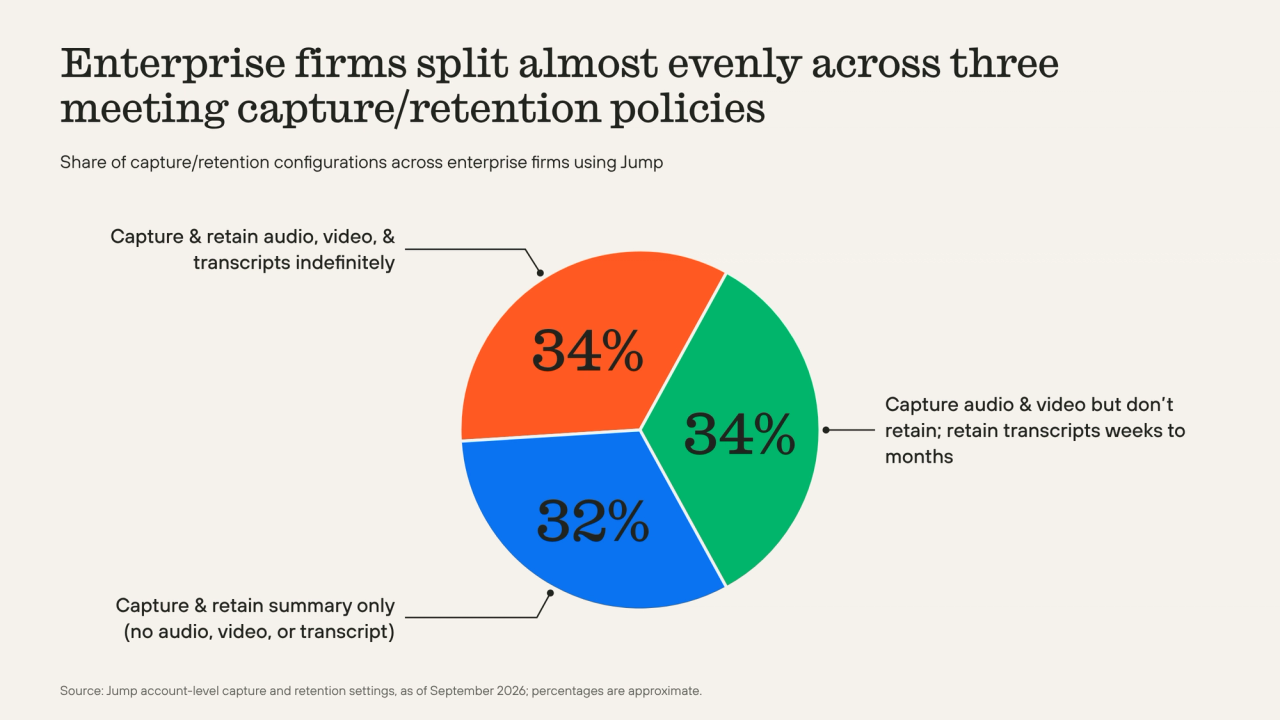
Enterprise firms using Jump in 2026 divide almost evenly across three recording and retention configurations. About a third record and keep all raw meeting data (audio, video, and transcripts) indefinitely. About a third record audio or video but delete the recordings immediately, keeping transcripts for a couple weeks up to a few months. About a third choose no recording and keep no transcript, capturing and retaining only a meeting summary. No single policy fits every firm.
Jump lets firms configure recording, capture, and retention to their policies
Jump lets firms set how meetings are captured and how long each output is kept, whether that’s a recording or a transcript, with one policy for the whole firm or different policies for different groups.
Firms are able to set separate deletion timelines for audio/video and transcripts, so a recording can be deleted right away while the transcript stays for a set number of days. But once a recording is deleted, there’s nothing to refer back to if a dispute comes up later.
Capture, retention, and consent rules can be set by advisor group, client type, and meeting type, so, for example, wealth and capital markets teams can run different policies. Firm administrators enforce those policies centrally with role-based access controls, single sign-on (SSO), System for Cross-domain Identity Management (SCIM), and required attestation before CRM sync.
To learn more, visit our resource library and Trust Center for a closer look at how we handle AI safety, data protection, and compliance configuration in detail.
How to evaluate AI platforms for compliance
Vendors describe recording, capture, and retention in different ways, so the settings behind each claim matter. Our guide, Selecting AI Platforms in Wealth Management, shows firm leaders how to test them, with what to look for, how to measure it, and which pitfalls to avoid, including letting a vendor’s default settings become firm policy.
Frequently asked questions
Is any AI notetaker truly recordingless?
It depends on what the vendor means, because no industry or regulatory body defines “recordingless.” Any tool that turns speech into a transcript has to hold audio somewhere for some interval. In Jump’s no recording mode, audio is processed in real time where the connection allows, or cached on the device where it doesn’t, and the cache is purged once processing completes.
Does no meeting recording mean no consent obligation?
Not necessarily, because consent follows the capture of a conversation rather than the file format it ends up in. Some firms have been told that choosing no recording removes the need for consent, and consent requirements vary by jurisdiction and firm policy.
Jump recommends explicit consent every time, with or without recording, and provides configurable disclosure and consent workflows per meeting type. Jump CEO Parker Ence has noted that every firm Jump has worked with voluntarily discloses meeting capture to clients, whether or not state law requires it, and no customer has canceled over client discomfort.
Does Jump train AI models on client data?
No. Jump does not use customer data to train, fine-tune, or improve any model. Whether AI trains on client data is one of the top concerns compliance teams raise when evaluating AI vendors, and Jump has executed Data Processing Agreements with its model providers that include zero-retention and no-training clauses.
Where can we get Jump’s security documentation?
Jump’s Security page and Trust Center. To support firms’ vendor due diligence, which regulators and industry groups describe as part of AI governance, Jump makes its SOC 2 Type II report, third-party penetration test results, and supporting documentation available directly from the Trust Center.
—-
The information provided by Jump is for informational purposes only and does not constitute legal advice. You should consult with your own qualified legal counsel regarding any legal questions or decisions specific to your circumstances.
Usage figures reflect account-level capture settings across nonarchived Jump accounts as of September 2026, and are shown in aggregate as approximate percentages. Enterprise figures are approximate and based on the configurations of Jump’s largest enterprise accounts. No individual firm is identified.