Get Feedback After Every Client Meeting with Coaching in Jump

Advisors have told us they want feedback on their client conversations, but often don’t have someone to review their meetings with them. Some have started copying meeting transcripts into AI tools to get that outside perspective. That adds another step to their work after each meeting.
Coaching brings that review directly into Jump. Available now for Jump Grow customers, it highlights what went well and what you could improve, alongside your meeting summary. It also draws on past meetings to help you spot recurring patterns and see where you’re making progress. You get specific feedback to bring into your next client conversation, without copying transcripts into another tool.
Here’s how Coaching works, where to find it, and how you can use it.
How Coaching works
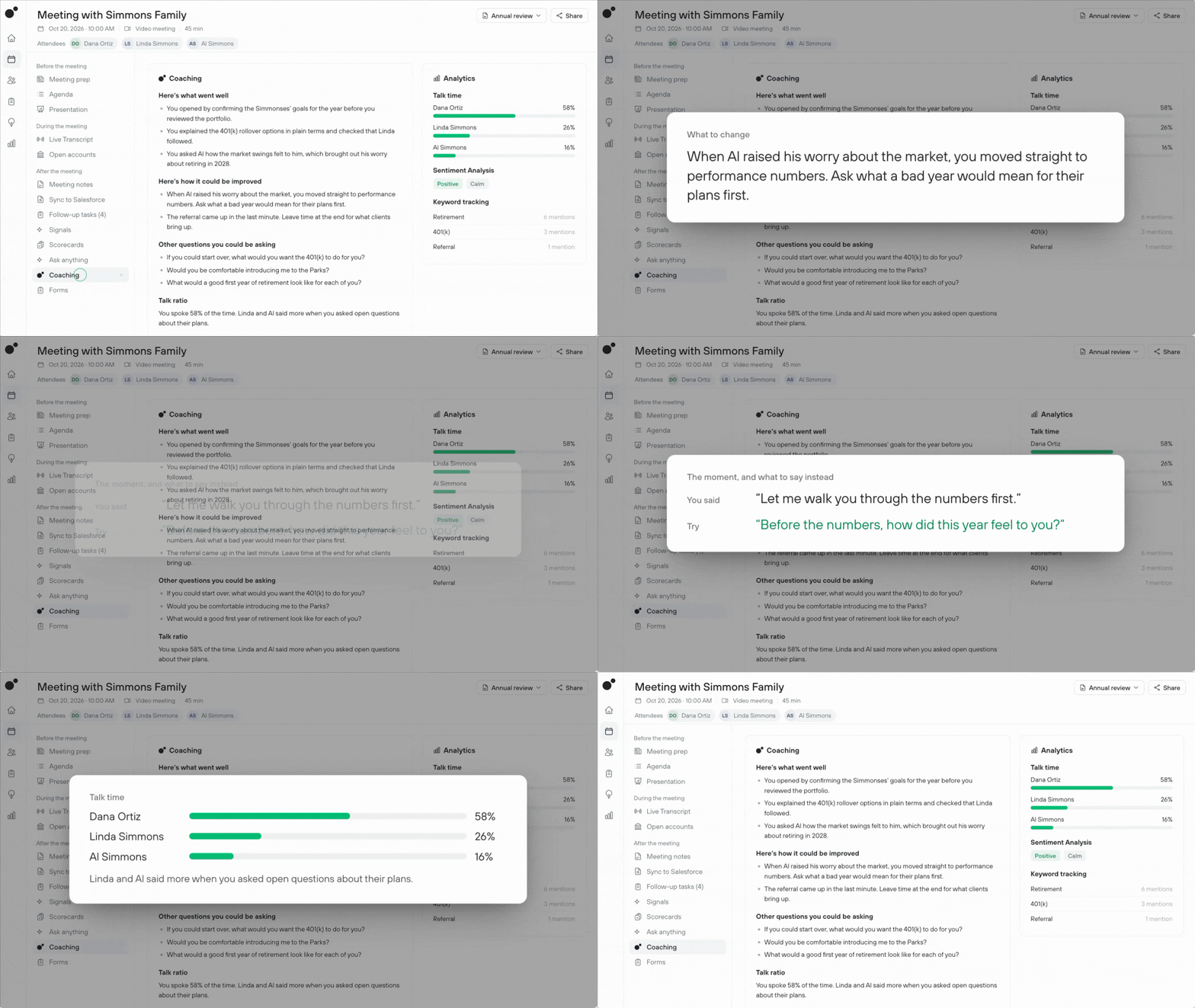
After each meeting, Coaching reviews the conversation along with data Jump already has, such as talk time and client sentiment. Coaching highlights three focus areas on what went well and on what you can improve. The feedback is specific, so you can choose something concrete to focus on in your next client conversation.
You’ll find Coaching in two places. First, on each meeting’s details page, you’ll see feedback for that meeting. Second, in the Insights tab, you’ll see Coaching across your recent meetings, including patterns that show up more than once and whether you’re improving on the areas you’ve been focusing on. Each insight links to the meetings behind it, so you can go back to the conversation it refers to.
As your meeting patterns change, Coaching updates what it highlights. That helps you decide where to focus your effort: which habits to keep building, which to adjust, and what to try in your next meeting.
Turn meeting feedback into better client conversations
1. Review a meeting while it’s fresh
Let’s say you finish an annual review with a couple nearing retirement and open the meeting in Jump to check the summary. Coaching highlights what went well: you opened with a clear agenda and summarized their goals back to them.
Coaching also identifies an opportunity to improve. You did most of the talking in the second half, so it suggests asking more open-ended questions next time. You leave with a specific way to give clients more room to share their concerns and help them feel heard.
2. Spot patterns across your meetings
In the Insights tab, Coaching looks across your recent meetings to find what keeps coming up. For example, it might flag that several prospect meetings over the past few weeks ended without a scheduled next step, and link to each one so you can see how the conversation wrapped up. That gives you something specific to revisit: whether each prospect leaves knowing what happens next.
3. Track progress on what you’re working on
Because Coaching remembers past feedback, it can tell you when something improves. If you’ve been working on asking discovery questions before making recommendations, Coaching notes when your recent meetings show the change and helps you choose what to focus on next.
Get started with Coaching
Coaching is available for Jump Grow customers.
Already a Grow customer? Open any client meeting or the Insights tab to see your feedback. Coaching is an allowed feature in your firm’s compliance settings, so if you don’t see feedback, ask your admin to turn it on.
Not a Grow customer yet? Talk to your account manager about adding Grow. New to Jump? Book a demo.